 Kiwi Code Docs
Connections & API Calls
Connect third-party apps and let the AI make API calls on your behalf — without exposing credentials.
Connections & API Calls
Kiwi Code connects to 100+ third-party services through OAuth and API keys. Once connected, the AI can make API calls to those services on your behalf — without ever seeing your credentials.
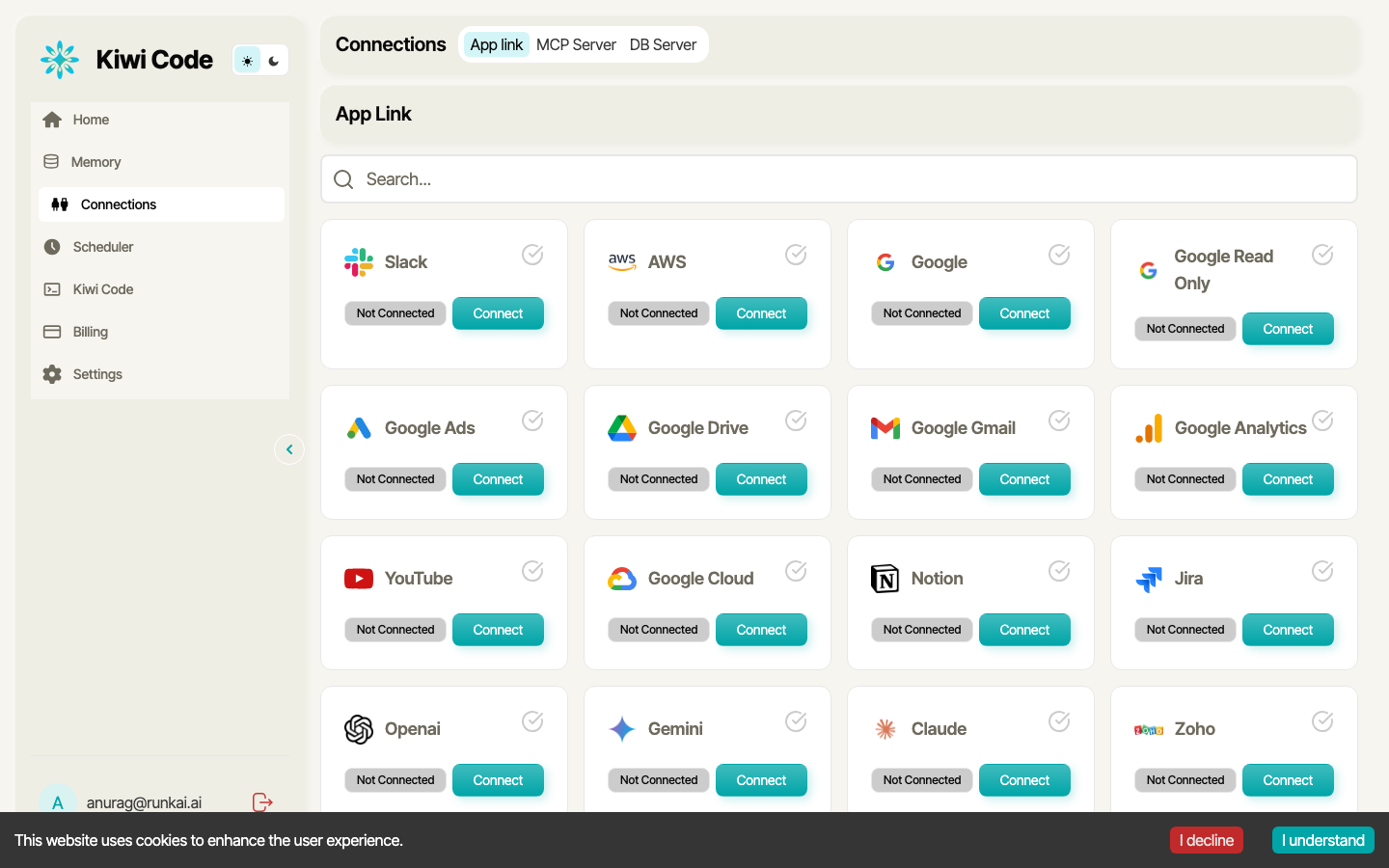
How Connections Work
Connections are set up in the web dashboard under Connections in the sidebar. There are three types:
| Type | Description |
|---|---|
| App Link | OAuth connections to services like Slack, Google, Jira, Notion, Salesforce, etc. |
| MCP Server | Model Context Protocol servers for custom tool integrations |
| DB Server | Direct database connections |
Setting Up a Connection
Open the Connections page
In the web dashboard, click Connections in the sidebar.
Find your service
Search or scroll through available integrations. Click Connect on the service you want.
Authorize access
For OAuth apps (Google, Slack, etc.), you'll be redirected to the service's authorization page. Grant the requested permissions and you'll be redirected back.
For API key services (OpenAI, etc.), paste your API key in the form.
Start using it
Once connected, ask the AI to interact with the service:
Send a Slack message to #general saying "deployment complete"The AI uses your connection automatically.
Available Integrations
Kiwi Code supports 100+ integrations including:
| Category | Services |
|---|---|
| Communication | Slack, Google Gmail, Microsoft Outlook |
| Cloud | AWS, Google Cloud |
| Project Management | Jira, Notion |
| Storage | Google Drive |
| Analytics | Google Analytics, Google Ads |
| Video | YouTube |
| AI Providers | OpenAI, Gemini, Claude |
| CRM | Salesforce, Zoho, HubSpot |
| And more | 80+ additional services |
The API Call Tool
When the AI needs to interact with an external service, it uses the api_call tool. This is the core mechanism that bridges AI conversations with real-world APIs.
How It Works
You: "Create a Jira ticket for the login bug"

AI thinks: I need to call the Jira API
AI uses api_call tool:
  - name: "jira"           ← connection name (NOT credentials)
  - method: "POST"
  - url: "/rest/api/3/issue"
  - body: { summary: "Login bug", ... }

Server-side:
  1. Looks up your Jira connection
  2. Injects OAuth token into Authorization header
  3. Rewrites URL to include your Jira domain
  4. Makes the HTTP request
  5. Returns result to AI

AI: "Created PROJ-142: Login bug"
What the AI Provides
When making an API call, the AI specifies:
- Connection name — which service to use (e.g.,
"slack","jira") - HTTP method —
GET,POST,PUT,DELETE,PATCH - URL — the API endpoint
- Headers — custom headers (non-auth)
- Query parameters — URL parameters
- Request body — JSON payload
- Files — file uploads
What the AI Does NOT Provide
The AI never sees or provides:
- Access tokens or refresh tokens
- API keys or secrets
- OAuth client IDs or secrets
- Passwords or private keys
- Any authentication credentials
Security Model
Credentials never touch the AI
The AI only knows the name of your connection (e.g., "slack"). Your actual tokens, API keys, and secrets are stored server-side and injected into the request at the last step — after the AI has already finished constructing the call.
Defense in Depth
-
Credential isolation — The AI prompt never contains sensitive fields. A hardcoded list of sensitive keys (
access_token,refresh_token,api_key,client_secret,password,private_key, etc.) is filtered before any connection metadata is returned to the AI. -
Server-side injection — Authentication headers are added by the server after the AI constructs the API call. The flow is:
- AI builds the request (URL, method, body)
- Server looks up the user's stored credentials for that connection
- Server injects
Authorization: Bearer <token>header - Server makes the HTTP request
- Result is returned to the AI
-
Per-user scoping — Each user's connections are isolated. You cannot access another user's connections.
-
Automatic token refresh — When OAuth tokens expire, the server automatically refreshes them using the stored refresh token. The AI doesn't need to handle token expiry.
-
Provider-side revocation — When you disconnect a service, Kiwi Code revokes access on the provider's side too (e.g., removes from Google's "Third-party access").
Authentication Methods by Service Type
| Service Type | Auth Method | Example |
|---|---|---|
| OAuth 2.0 | Bearer token auto-injected | Google, Slack, Salesforce, Jira |
| API Key | Key injected as Bearer or custom header | OpenAI, Anthropic |
| AWS | SigV4 signature computed from request | AWS services |
| mTLS | SSL certificate provided | ADP, enterprise services |
Example Prompts
Once you've connected a service, you can ask the AI to use it naturally:
# Slack
Send a message to #engineering with today's deploy summary

# Google Drive
List all documents in the "Project Plans" folder

# Jira
Create a bug ticket: "Login fails with special characters in password"

# Google Gmail
Draft an email to the team about the release

# AWS
List all S3 buckets in us-east-1

# Salesforce
Find all open opportunities worth more than $50k
Managing Connections
View Connected Services
In the web dashboard, go to Connections to see all available and connected services.
Disconnect a Service
Click on a connected service and select Disconnect. This revokes the OAuth token on both sides.
Multiple Connections
You can have multiple connections to the same service (e.g., two different Google accounts). When making API calls, specify which connection to use by name.